


☕ Welcome to The Coder Cafe! A few weeks ago, I built Barista: describe what you like to read in your own words, and every day it emails you a few posts worth your time, picked from hundreds of engineering blogs, Hacker News, Lobsters, and arXiv. This is the first part of a series on how it works: not a tutorial, but the decisions behind a real system I built and run in production. This week, we explore its architecture. You’ll see how embeddings turn meaning into geometry, how a decision model judges what’s actually worth your time, and how a single Postgres can be a queue, a scheduler, and a vector database, with no message broker in sight. Get cozy, grab a coffee, and let’s begin!
Problem
When I started as a software engineer (10+ years ago), my daily routine was to go through Twitter and read every single post from the people I followed since the day before. I could also consistently read every post in my small RSS feed.
I was happy with my tech watch, and I was consistent.
Fast forward to today: there’s been an absolute explosion of information. Twitter now defaults to “For you”, so my feed is infinite. Meanwhile, my RSS reader currently shows 1,457 unread posts. There’s just too much, all the time.
I created The Coder Cafe to solve this exact problem. My initial idea was to write one post a day, so that readers could learn one thing every day. The original newsletter’s description said it all:
Feeling overwhelmed by the endless stream of tech content?
At The Coder Cafe, we serve timeless concepts with your coffee, every day.
Then things changed (👶), and I couldn’t keep up with one post a day anymore, so I switched to a more sustainable pace. In doing so, I lost the initial premise: helping people read less while still reading quality content.
I’d given up on that idea until… recently.
A few weeks ago, I started looking for ways to improve my tech watch (yet again). One of the tools I found was devdigest.io. However, its sign-up page looked like this, asking me which topic I wanted to subscribe to:

I don’t know about you, but for me it doesn’t work. What if, instead of “Software engineering”, I want to be more specific and say I love this or that language? Or that I love posts about testing? There was no way to do that.
I kept looking, but never found what I wanted. So I started building it.
Introducing Barista
I originally built Barista for myself. The initial idea was simple: let it fetch lots of content from the web. Then I would just give it a prompt describing my interests, in my own words. For example:
I’m a senior SRE and Go engineer. Show me deep, technical content on:
Programming: programming concepts, unit tests, etc.
Go: performance, profiling, latency, runtime internals
Systems fundamentals: Linux internals (processes, memory, I/O), databases, Postgres, etc.
Kubernetes internals: controllers/operators, reconciliation, kube-apiserver, edge and fleet-scale rollouts
Reliability & SRE: safe rollouts, disruption management, resiliency, incident analysis, etc.
Prefer: first-principles explanations, architecture write-ups, benchmarks with data, lessons from production.
Skip: beginner tutorials, listicles, framework hype, marketing posts, generic AI news.
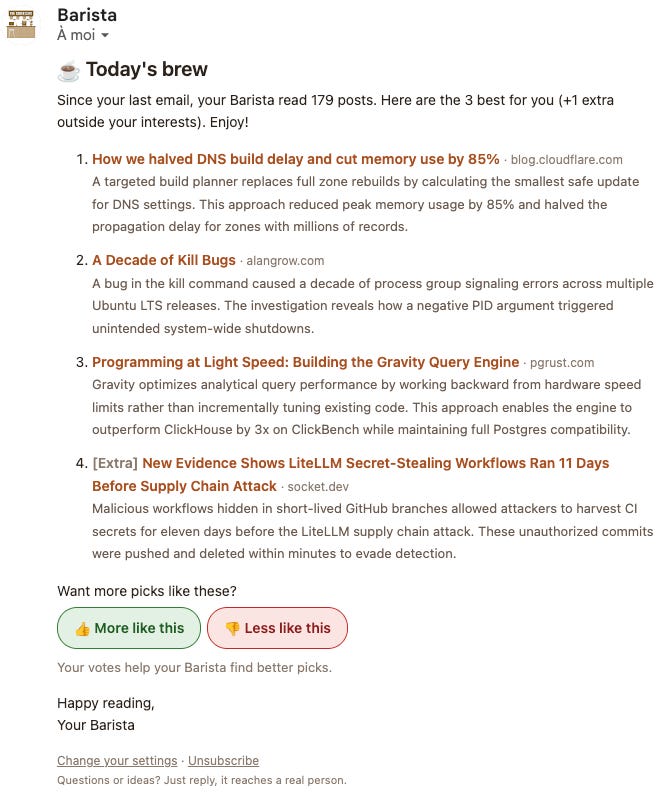
From there, the system filters out everything outside my interests, plus spam, low-quality content, etc. Then, it sends me one email a day with a few posts.
After using it for a while, I thought: if I enjoy it this much, why not turn it into a product and see if others like it too?
In this first part, let’s look at how it works under the hood and at the main decisions I made along the way.
Pipeline-Based Architecture
At a high level, Barista is built as a pipeline:
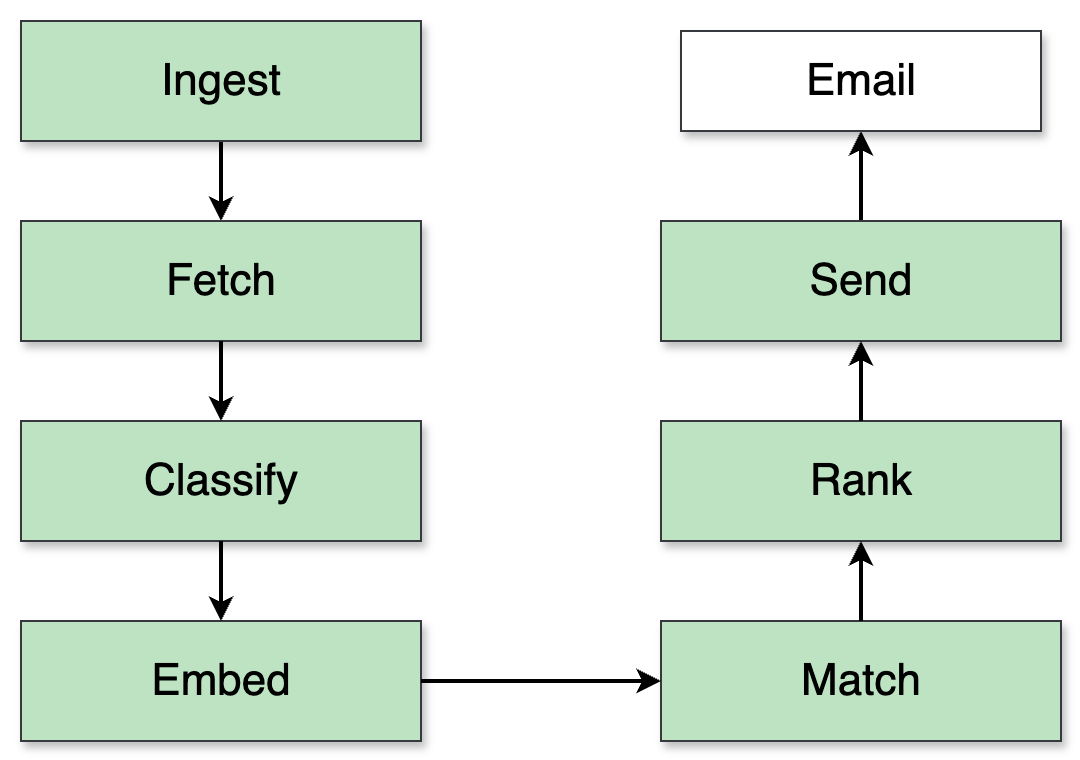
It has two halves, and they work very differently.
The left half is about posts. Ingest, fetch, classify, and embed run all day long, and each post goes through them exactly once, no matter who ends up reading it. A post is downloaded once, classified once, and embedded once, whether it ends up in zero inboxes or a hundred. Each stage hands posts to the next through a queue.
The right half is about users. Match, rank, and send run once a day per user, and there’s no queue here: what drives them is the clock. Each user picks a send hour, and the system works back from it. Match runs two hours before, rank one hour before, and send right on time.
The stages are the following:
Ingest: Polls the sources and records each new post’s URL. A URL it has already seen is skipped, so each post enters Barista only once.
Fetch: Downloads each post’s page and extracts its title, author, date, and text. A post is dropped if the page can’t be read, isn’t in English, or is too short, for example. It also respects
robots.txtand never hits the same site more than once every couple of seconds.Classify: Asks an LLM what the post is: its topic, how deep and how good it is, and whether it’s spam or a paywall teaser. Anything off-topic, spammy, or low quality is dropped here.
Embed: Turns the post into a vector, a list of numbers capturing what it’s about (more on that below). From here, the post becomes a candidate for every user.
Match: Two hours before a user’s send time, it takes the user’s interests (embedded into the same space when they saved them) and finds the recent posts whose vectors are closest. The closest ones become that user’s backlog.
Rank: An hour before send time, an LLM grades how well each new post in the backlog fits the user’s interests, taking their recent votes into account. The best-graded posts are picked for the day.
Send: At the user’s chosen hour, sends the email with the day’s picks, each with “More like this” and “Less like this” buttons. That feedback flows back into future rank runs.
So how do these stages talk to each other? Through Postgres.
Postgres as the Backbone
When we hear “a pipeline of stages”, the reflex might be to reach for a message broker: Kafka, RabbitMQ, maybe Redis streams. That was my reflex too. Yet going against my instincts, Barista doesn’t have one: every arrow in the diagram is Postgres.
Queues are tables. In the per-post half, each stage drains a table filled by the previous one. Ingest writes new URLs into events_ingested, fetch drains it and writes into events_fetched, and so on down the line. Several workers process a stage in parallel, and each claims its next row like this:
SELECT ... FOR UPDATE SKIP LOCKEDFOR UPDATE locks the row so no other worker can take it. SKIP LOCKED means the other workers don’t wait on it; they move on to the next free row. That’s a work queue in one SQL clause.
Retries and dead letters are just data too. A row that fails gets a not_before timestamp and is retried later, with a backoff that starts at 5 minutes and doubles up to 6 hours. After 10 failures, about a day in, it’s moved into a rejected table with the reason, so one broken page never blocks the posts behind it.
Schedules are columns. The per-user half keeps its schedule on the user row, in three timestamps: next_select_at, next_rank_at and next_send_at. Each stage picks up the users whose timestamp is due, does its work, and moves its timestamp to the next day. Each stage also waits for the previous one: rank only handles a user once match has moved that user’s next_select_at into the future, meaning “match is done for today”.
So there’s no scheduler service or workflow engine to run. Each stage just queries for the users who are due.
Each stage is a short-lived job. A stage is a small program started on a cron. It wakes up, processes whatever is due, and exits. Nothing runs, and nothing costs anything, between runs.
So why not Kafka? In the end, running a personal project is also about being pragmatic, and three reasons won me over.
First, scale. Barista processes a few hundred posts a day, not millions of events per second. Kafka shines at throughput I simply don’t have, and it would be one more system to run, monitor, and pay for, next to a database I need anyway.
Second, and that’s the reason I care about most: the queue and the data live in the same transaction. When fetch processes a post, claiming the row, saving the extracted text, and queuing the post for the next stage all happen in one transaction. Either everything commits, or nothing does. If the job crashes halfway, the transaction rolls back, the row is unlocked, and the next run picks it up as if nothing happened. With a broker, that’s much harder. We write to the database, and we acknowledge a message (or publish one), two systems that can’t commit together. Crash between the two, and we either lose work or do it twice. Solving that properly is a whole topic on its own (the transactional outbox pattern exists precisely for this). With everything in Postgres, the problem just doesn’t exist (or barely).
Third, everything is queryable. A post’s whole journey, from the URL ingest found to the email it ended up in, is a set of rows. For example, “Why didn’t this post reach anyone?” becomes an SQL query.
All of this runs on a single Cloud SQL db-f1-micro, Google’s smallest tier: a shared CPU and 614 MB of memory, for about $8 a month. Will it be enough forever? Probably not. But when it isn’t anymore, I’ll have a good problem, and I’ll know exactly which part to move out first.
Choosing Postgres is not entirely free, though. In some stages, that transaction stays open during the network call (downloading a page, asking the LLM), which holds a lock and a database connection the whole time. It’s a tradeoff I’ll come back to in a future post, because it bit me once.
Postgres has one more role I haven’t mentioned yet: it’s also my vector database.
Postgres as a Vector Database
Postgres has one more job, and it’s the one that makes Barista work: finding the posts that fit what a user wrote in plain English.
Here’s the problem. On one side, thousands of posts. On the other, a user who wrote a paragraph about what they like. How do we match the two?
The naive answer is keyword search: look for posts containing “Go”, “Kubernetes”, “Postgres”. It breaks quickly. A great post about MVCC might never write “Postgres” in its title. A post that mentions “Go” five times might be about the board game. Keywords capture words, not meaning. That’s what embeddings solve.
An embedding is a list of numbers representing a piece of text. In Barista, each post becomes a list of 1,024 numbers, computed by an embedding model from the post’s title and text.
On their own, those numbers mean nothing to a human. There’s no “number 42 means Postgres”. What matters is where the list sits compared to the others. Think of each list as the coordinates of a point, not on a 2D map but in a space with 1,024 dimensions. The model was trained on huge amounts of text with one goal: texts that mean similar things should end up close to each other in that space, and unrelated texts far apart.
So a post on how Postgres implements MVCC and a post on transaction isolation levels land near each other, even if they barely share a word. And the post about Go the board game lands far from the one about goroutines, even though both say “Go” all the time.
“Close” is measured with cosine distance. Roughly, it’s the angle between two vectors: a small angle means similar meaning, a large one means unrelated.
Now here’s the trick: your interests are embedded too, into the same space. When you write “I love posts about Go performance, profiling and runtime internals”, that sentence becomes a point, just like the posts. Finding posts for you becomes a geometry problem: which posts are the closest points to your interests?
Two details make it work well in practice:
Posts and interests aren’t embedded the same way. A post is embedded as a document; the interests as a query. A two-line description of what you want doesn’t look like the long article that answers it, and embedding models handle this asymmetric case explicitly.
A prompt with several interests is split. My own prompt covers Go, Linux internals, Kubernetes, and reliability. As a single vector, it would land somewhere in the middle of all of them, close to none. So Barista has an LLM split the prompt into separate interests, embeds each one, and looks for posts close to any of them.
This is where pgvector comes in. It’s a Postgres extension that adds a vector column type and distance operators. Embeddings are stored in a plain table, next to everything else, and finding the closest posts is a SQL query. Simplified:
SELECT pe.post_id, pe.embedding <=> $1 AS distance
FROM post_embedding pe
JOIN posts p ON p.id = pe.post_id
WHERE p.discovered_at >= $2    -- Within the user’s window
  AND pe.post_id NOT IN (      -- Never offered before
    SELECT post_id FROM selections WHERE user_id = $3)
ORDER BY distance
LIMIT 20;
<=> is pgvector’s cosine distance operator.
And that query is why I didn’t reach for a dedicated vector database. The search also has to filter. I want the closest vectors among posts from the last 30 days, never offered to this user before, not from a site they blocked, and preferably one per site. Every one of those filters is regular data that already lives in Postgres. With a separate vector store, I would have to copy that data there and keep it in sync, or search broadly and filter afterwards. With pgvector, it’s one WHERE clause.
Judging Posts With Jev
Embeddings tell Barista what a post is roughly about. They can’t tell whether it’s any good, whether it’s spam, or whether it’s actually what you want to read today. For that, Barista uses a decision model: Jev by TypeSafe. It reads natural language, but it doesn’t write any. It only answers questions.
So instead of a prompt and some free-form text back, we send it two things:
A state: The data to judge, as JSON
Questions: Each with a type that defines the shape of the answer
There are three question types:
Choice: Pick one option from a list we provide
Score: Pick a level on a scale we describe (2 to 10 ordered levels)
Noul: A yes/no question, answered as a probability
And the answers come back typed too. So I can skip the “please answer in valid JSON”, the regex on the output, and the retry when the model decides to add a friendly sentence first.
Another detail I love: a score answer is probability-weighted, so instead of 2, we get something like 2.37. That’s a lot more useful when we need to compare and threshold things.
Barista asks Jev questions in two places.
Classify: The Cheap Gate
Every post that gets through fetch is sent to Jev once, with multiple questions:
Domain (choice): What is the primary domain of this post?
Depth (score): How technically deep is this post?
Quality (score): How well-written and substantive is this post?
Paywall teaser (noul): Is this a paywall teaser?
Spam (noul): Is this spam?
The rules are implemented in plain Go. For example, spam probability above 0.7? Dropped.
The point is to filter as early as possible. A post dropped here costs a fraction of a cent once, and then never costs anything again: no embedding, no grading, for any user. And the answers are stored, so the topic, depth and quality feed the later stages.
Rank: The Precise Judge
This is where Jev does the real work. Match gave each user a short list of candidates, found cheaply with embeddings. Now Jev grades each one with a single question, “How well does this post fit the user’s interests?”, on four levels:
Poor fit: largely unrelated to the user’s stated interest
Weak fit: tangentially related but not a strong match
Good fit: clearly matches the user’s stated interest
Excellent fit: a standout match, exactly what the user is looking for
The state holds the user’s prompt, the candidate (title, description, the opening of its text, plus classify’s topic, depth, and quality), and the user’s last five days of 👍/👎 votes, with comments if they left any. So “fewer AI posts, please” really does change what gets picked.
A design decision I didn’t expect to make: I grade each candidate in its own request. My first version sent the whole backlog in one request and asked Jev to grade everything at once. It was cheaper in calls, but the grades were unstable. Jev judges each question against the whole state, so the other candidates in the request acted as distractors and shifted each other’s grades. The same post could be “Good” on Monday and “Weak” on Tuesday, just because of its neighbors.
Graded alone, a post’s grade only depends on the post and on you. That makes it stable, and since it’s stable, it’s worth keeping. Each grade is stored and reused for as long as the post stays in your backlog. A post is only graded again if you leave new feedback, since your votes might change the verdict.
Then picking is simple: the best-graded posts win. For a small email, a post needs at least “Good” to be picked. The one exception is the day’s best candidate, so you always get at least one post. Barista would rather send you two great posts than pad the email with a third mediocre one.
Embeddings for Recall, Jev for Precision
If we step back, the split looks like this:
Match (embeddings): from thousands of posts to a short list. Cheap, fast, approximate
Rank (Jev): from that short list to the few posts in your email. Slower, costs money per call, precise
To summarize:
Embeddings answer “what is this roughly about?”
Jev answers “is this actually good for you?”
What Else?
So far, this sounds like a reasonable little system. Here’s what I left out. Barista also has:
About 23,000 lines of Go, and 31,000 more lines of tests (yes, more test code than code).
22 alerts and nearly 50 custom metrics.
An AI on-caller to triage alerts.
A TLA+ spec, model-checked, to make sure nobody gets two emails a day.
A randomized simulation that replays days of pipeline life on a fake clock.
A chaos test that throws 1,000 simultaneous users at a database the size of a Raspberry Pi.
All of that for… currently 5 users.
Over-engineered? Probably 😁. But it makes for good material for a series. Each item on that list comes with a story, and some of them surprised me. Starting next week with the first one: how I tried to prove that nobody gets two emails a day, and my test failed on its very first run.
In the meantime, if you want to see what this pipeline picks for you, give Barista a try. Describe what you like to read, and your first email lands in your inbox in seconds. It’s free (one post a day), and every new account gets 7 days of the paid plan to try more.
